
Celebrating 26 Years of IPSR
Join our journey
Nithin J K
Junior Software Engineer
- March 10, 2026
Building Secure Flutter Applications: A Practical Guide for Modern Developers
Mobile applications today handle sensitive information such as personal data, financial details, authentication tokens, and health records. As Flutter continues to gain popularity for cross-platform development, developers must also focus on security-first development practices.
Flutter provides powerful tools to build high-performance apps for Android, iOS, Web, and Desktop from a single codebase. However, security is not automatic — developers must deliberately design secure systems.
Let’s explore the key security principles and best practices when building Flutter applications, based on real-world development experience and modern mobile security practices.
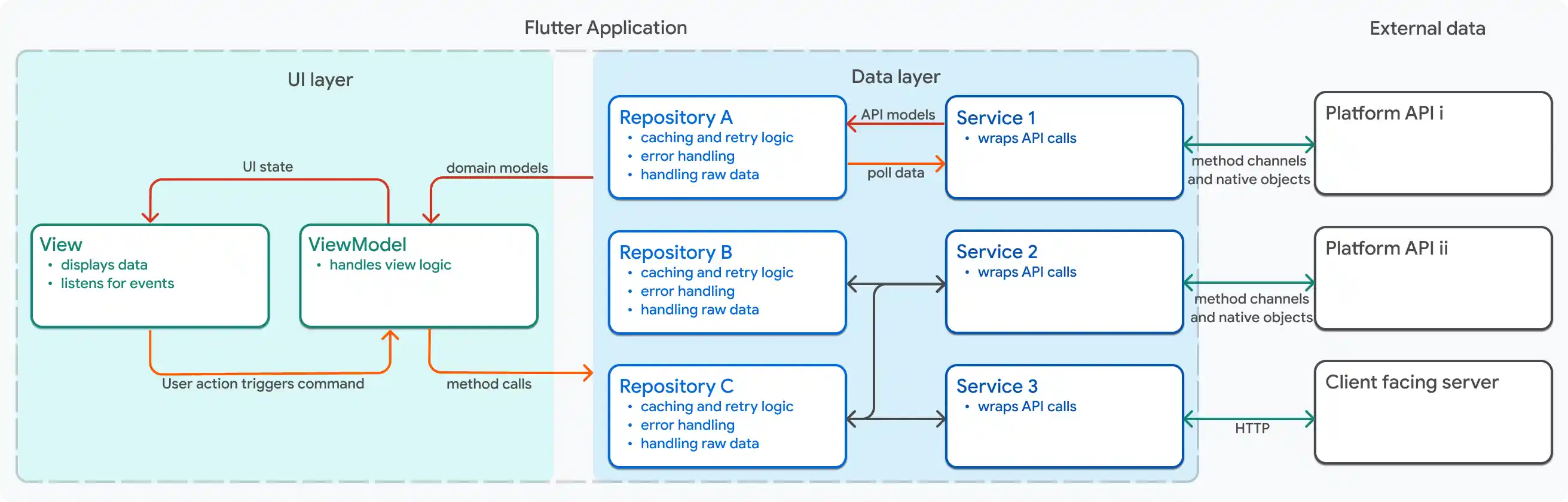
Why Security Matters in Flutter Apps
Flutter applications often communicate with APIs, manage user authentication, store local data, and integrate with third-party services. Each of these introduces potential vulnerabilities if not handled correctly.
Some common risks include:
- API key exposure
- Insecure storage of tokens
- Reverse engineering of APKs
- Man-in-the-middle (MITM) attacks
- Weak authentication flows
- Poor network security practices
A secure Flutter app must consider security at multiple layers:
- Device level
- Application level
- Network level
- Backend communication
Security should be integrated from the architecture stage, not added as an afterthought.
Secure Authentication Implementation
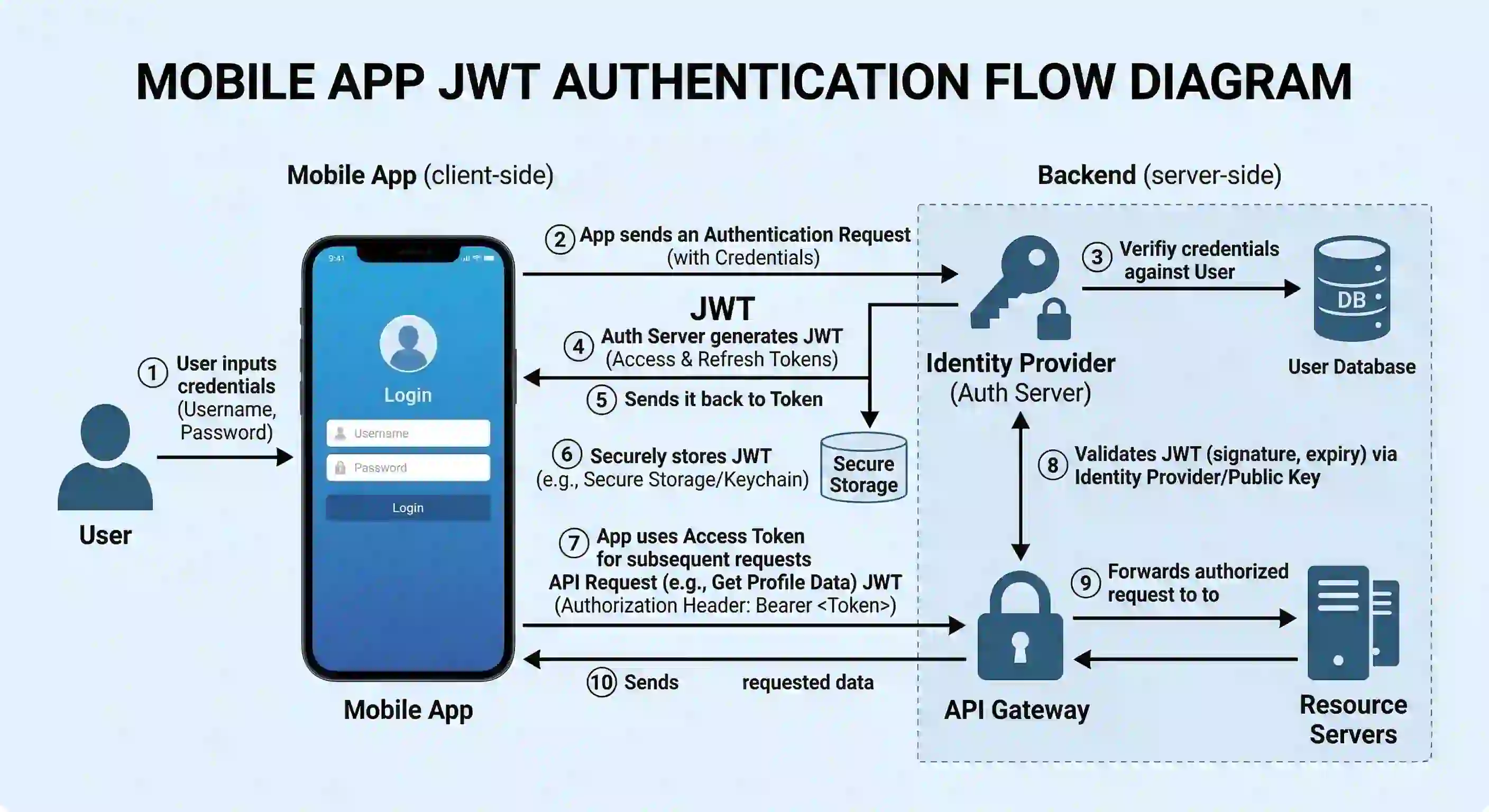
Authentication is one of the most critical components of any application.
Most Flutter apps implement authentication using REST APIs or services like Firebase. Regardless of the approach, the authentication flow should be designed securely.
Key practices include:
Token-Based Authentication
Instead of storing user credentials, modern applications rely on token-based authentication.
Common tokens include:
- JWT (JSON Web Token)
- Access tokens
- Refresh tokens
The recommended approach:
- User logs in with credentials
- Server returns an access token
- App stores the token securely
- Token is attached to future API requests
Example using Dio interceptor:
dio.interceptors.add(
InterceptorsWrapper(
onRequest: (options, handler) {
options.headers["Authorization"] = "Bearer $token";
return handler.next(options);
},
),
);
This ensures every API request includes the authentication token automatically.
Secure Local Storage
Many applications store user data locally such as:
- authentication tokens
- cached user data
- preferences
Using insecure storage can expose sensitive information if the device is compromised.
Avoid Storing Sensitive Data in:
- SharedPreferences
- Plain text files
- Local databases without encryption
Use Secure Storage Instead
Flutter provides packages like:
- flutter_secure_storage
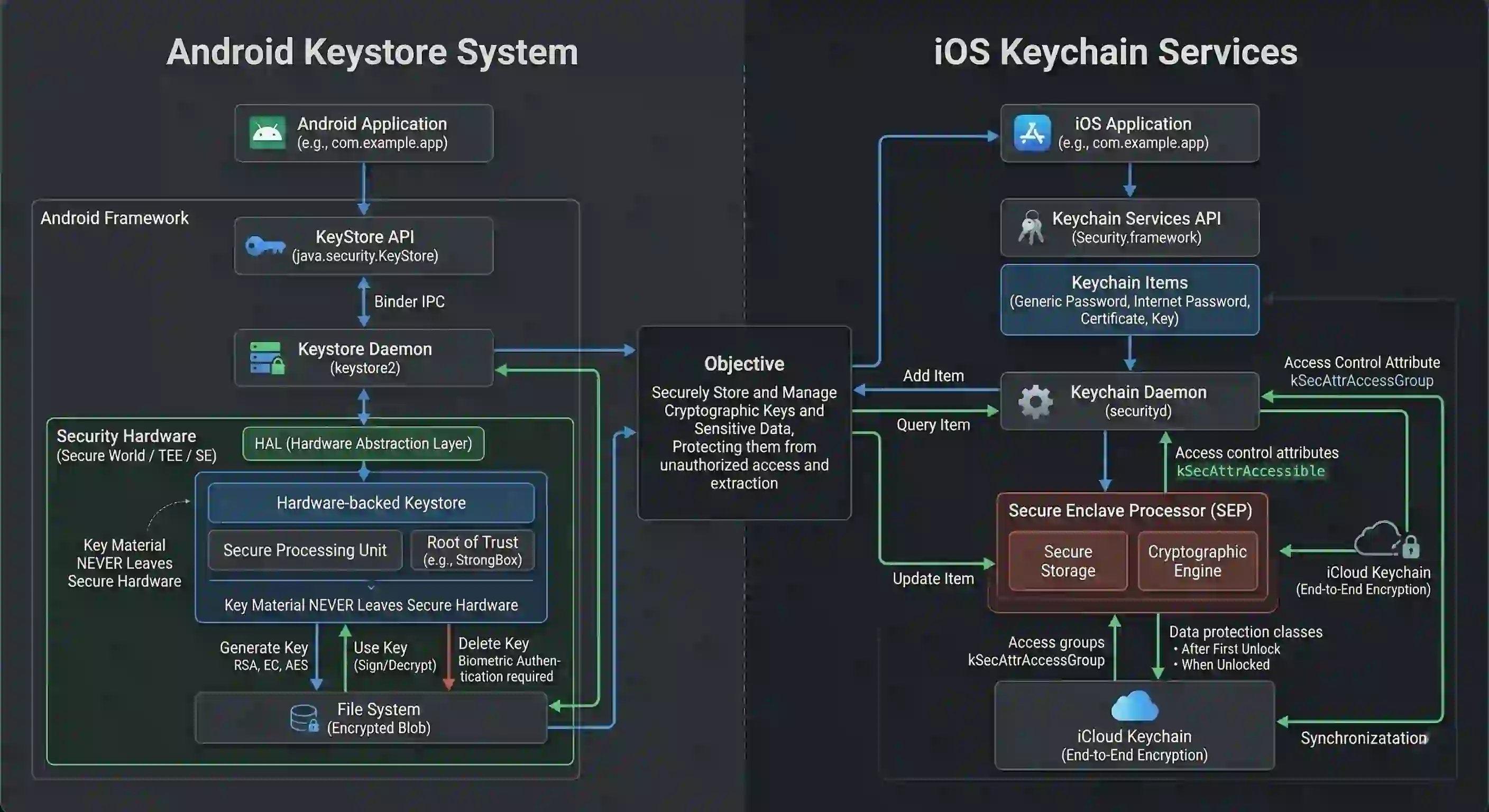
This package stores sensitive data using:
- Android Keystore
- iOS Keychain
Example:
final storage = FlutterSecureStorage();
await storage.write(
key: "auth_token",
value: token,
);
Secure storage ensures tokens are encrypted and protected by the device’s security system.
Protecting API Communication
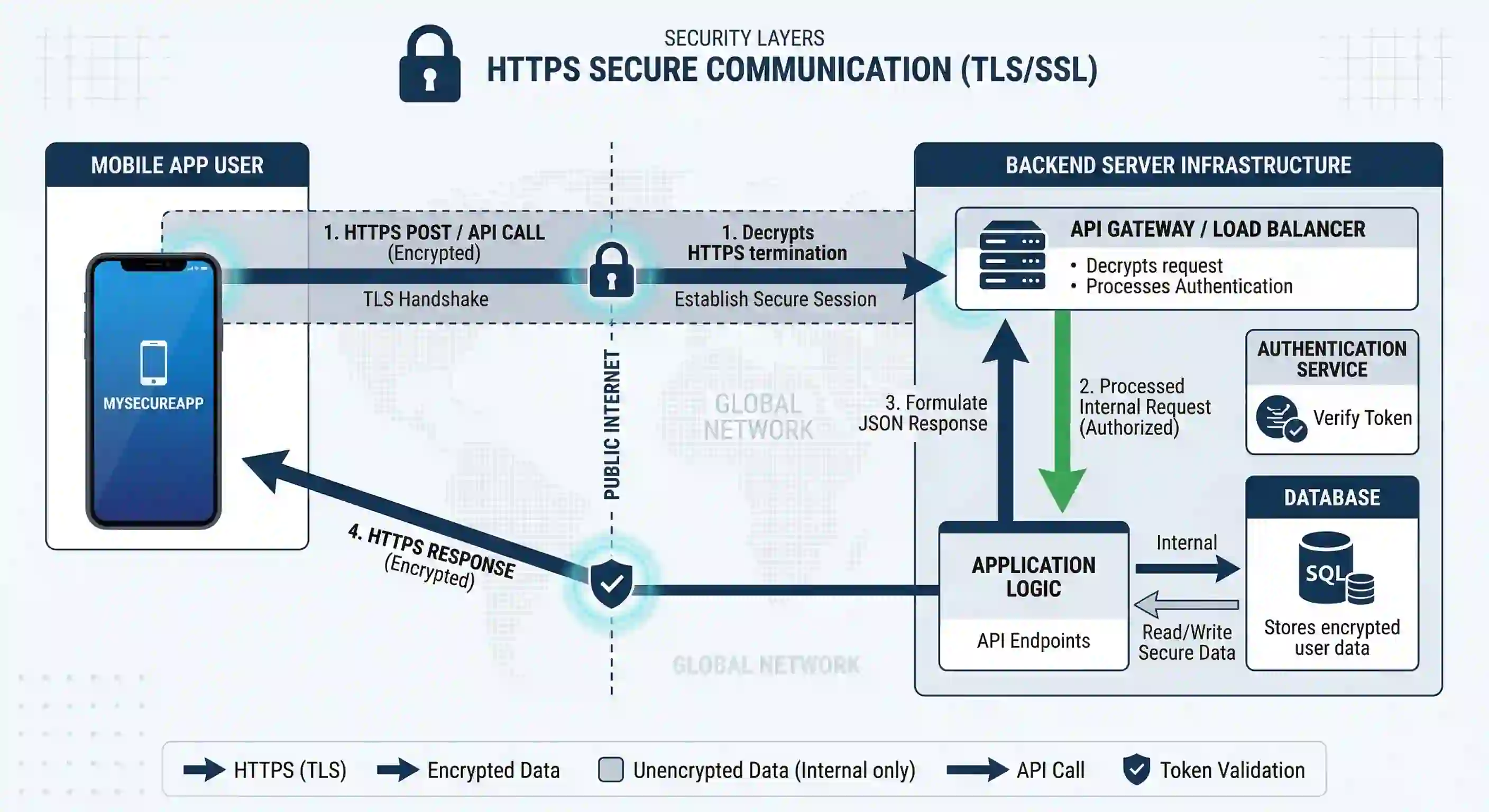
Applications communicate with backend servers through HTTP requests. If this communication is not secured properly, attackers can intercept or manipulate data.
Always Use HTTPS
Never send sensitive data over plain HTTP.
Secure communication requires:
https://api.example.com
HTTPS encrypts communication between the mobile app and the server.
Certificate Pinning
Even HTTPS can be vulnerable to man-in-the-middle attacks if malicious certificates are installed on a device.
Certificate pinning ensures the app communicates only with the trusted server certificate.
In Flutter, certificate pinning can be implemented using libraries or custom HTTP clients.
Benefits:
- Prevents interception
- Ensures server authenticity
Securing API Keys and Secrets
Many apps integrate services like:
- Google Maps
- Payment gateways
- AI services
These integrations require API keys. If these keys are embedded directly in the source code, attackers can extract them by reverse engineering the app.
Best Practices
Never hardcode secrets directly inside the app.
Instead:
- Store keys on backend servers
- Use proxy APIs
- Restrict API keys with domain or package restrictions
Example of a secure flow:
Flutter App → Backend Server → Third Party API
This prevents API key exposure in the mobile app.
Code Obfuscation to Prevent Reverse Engineering
Android APKs can easily be decompiled. Attackers can analyze application logic and extract sensitive information.
Flutter provides code obfuscation to make reverse engineering harder.
Enable obfuscation during release builds:
flutter build apk --obfuscate --split-debug-info=/<directory>
Benefits include:
- Renaming symbols
- Making code harder to analyze
- Protecting business logic
While this does not completely prevent reverse engineering, it significantly increases the difficulty.
Input Validation and Data Sanitization
Applications must assume that all input is potentially malicious.
Examples of user inputs include:
- login forms
- search fields
- API responses
- uploaded files
Poor validation can lead to vulnerabilities like:
- injection attacks
- malformed data crashes
- unexpected behavior
Best Practices
Always validate:
- email formats
- numeric inputs
- text length
- file types
Example:
if (email.isEmpty || !email.contains("@")) {
return "Enter a valid email";
}
Validation should happen on both client and server sides.
Secure State Management
Flutter apps commonly use state management tools such as:
- Provider
- Riverpod
- Bloc
- GetX
Sensitive data stored in global state objects can potentially be accessed by unintended parts of the app.
Best practices:
- Store only necessary data in state
- Avoid storing tokens in easily accessible objects
- Clear the authentication state on logout
For example:
authController.logout() {
token = null;
user = null;
notifyListeners();
}
This prevents stale sessions from being reused.
Protecting Against Debugging and Tampering
Attackers may attempt to run apps in:
- rooted devices
- emulators
- debugging environments
Security-sensitive applications (banking, healthcare, enterprise apps) often implement additional protections.
Common strategies include:
- Root detection
- Emulator detection
- Debug mode detection
Flutter plugins exist that help detect such environments.
If detected, the app can:
- restrict functionality
- block login
- notify backend servers
Dependency Security
Flutter projects rely heavily on open-source packages from pub.dev. While this accelerates development, it also introduces potential risks.
Developers should:
- Use well-maintained packages
- Avoid abandoned libraries
- Review package permissions
- Keep dependencies updated
Run:
flutter pub outdated
This helps identify outdated or vulnerable packages.
Regular updates improve both security and stability.
Secure Logging Practices
During development, logs often include sensitive information such as:
- API responses
- tokens
- user details
Example of risky logging:
print("Token: $token");
In production builds, sensitive logs should be removed.
Use controlled logging tools and disable verbose logs in release mode.
Security as an Ongoing Process
Security is not a one-time activity. As applications grow, new vulnerabilities may appear.
Developers should regularly:
- audit API usage
- review authentication flows
- update dependencies
- perform penetration testing
- monitor suspicious activities
A security-first mindset helps build trustworthy applications and protects user data.
Conclusion
Flutter enables developers to build beautiful cross-platform applications quickly. However, speed of development should never compromise security.
A secure Flutter application requires attention to:
- authentication
- secure storage
- API protection
- network security
- dependency management
- code protection
By implementing these practices, developers can create Flutter applications that are not only powerful and scalable but also safe and resilient against modern security threats.
Security should be considered a core feature of every application, not an optional enhancement.
You may also like

The Importance of Cyber Security Certification in 2025
July 18, 2024The Richest Tech Billionaires in this Planet
Jan. 1, 2024Four career tips for job seekers in IT
Jan. 1, 2024